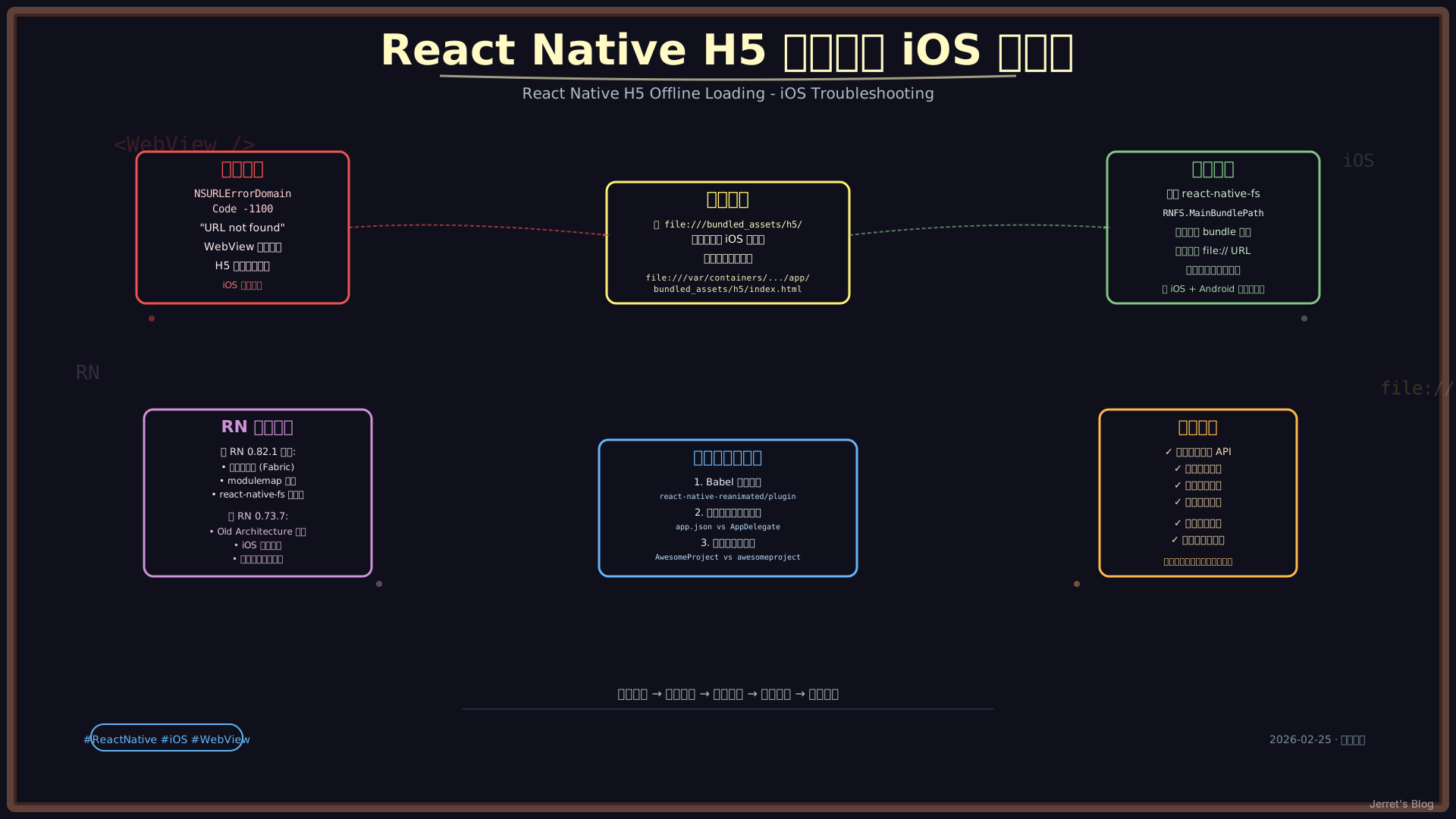
问题背景
在 React Native 容器应用中,我们需要实现 H5 页面的离线加载功能。需求很简单:
- 将 H5 资源打包到 app bundle 中
- 使用 WebView 加载本地 HTML 文件
- 支持 Android 和 iOS 双平台
Android 平台顺利实现,但 iOS 却遇到了 NSURLErrorBadURL (-1100) 错误。
版本选择:为什么从 RN 0.82.1 降级到 0.73.7?
项目最初使用 React Native 0.82.1,但在 iOS 构建时遇到了无法解决的 modulemap 错误:
error: module map file '/Users/.../RNReanimated.modulemap' not foundRN 0.82.1 的问题
| 问题 | 描述 | 影响 |
|---|---|---|
| 新架构强制依赖 | 0.82.x 强制使用 New Architecture (Fabric/TurboModules) | 需要大量代码迁移 |
| 第三方库兼容性 | react-native-reanimated 等 library 的 modulemap 配置问题 | iOS 构建失败 |
| Codegen 配置复杂 | 需要配置 package.json 的 codegenConfig | 增加维护成本 |
| C++ 依赖问题 | 新架构依赖的 C++ 库在 CocoaPods 中解析失败 | 无法构建 |
降级到 RN 0.73.7 的原因
经过评估,选择降级到 React Native 0.73.7:
| 特性 | RN 0.73.7 | RN 0.82.1 |
|---|---|---|
| 架构 | Old Architecture (默认) | New Architecture (强制) |
| iOS 构建 | ✅ 稳定 | ❌ modulemap 错误 |
| 第三方库兼容 | ✅ 良好 | ⚠️ 部分库不兼容 |
| Codegen | 可选 | 强制 |
| react-native-fs | ✅ 完全兼容 | ⚠️ Legacy Module (潜在问题) |
| 维护成本 | 低 | 高 |
react-native-fs 兼容性说明:
虽然
react-native-fs官方声明支持所有 RN 版本,但在 RN 0.82.x 的强制新架构环境下存在潜在问题:
- 使用 Legacy Native Module 系统,与 TurboModules 不兼容
- 可能收到弃用警告,未来版本不支持
- 新架构渲染引擎 (Fabric) 可能有兼容性问题
如果坚持使用 RN 0.82.x,需要寻找替代方案, 已尝试 expo 同样不太行,需要客户端同学支持从客户端底层调整:
expo-file-system(需要 Expo SDK)- 自定义 TurboModule (开发成本高)
- 社区方案如
react-native-fs-turbo(非官方)
注意:如果项目必须使用新架构特性(如 Fabric 渲染、TurboModules),则需要花时间解决 modulemap 配置问题并替换不兼容的第三方库。
降级过程中的其他问题
除了 modulemap 错误,降级过程还遇到了以下问题(后文详述):
- Babel 配置错误 -
react-native-reanimated/plugin引用 - 组件注册名称不匹配 -
app.json与 AppDelegate 不一致 - H5 离线加载 NSURL 错误 - 本文重点讨论
错误现象
iOS 模拟器中 WebView 显示:
Error loading page
NSURLErrorDomain Code -1100
"The requested URL was not found on this server."
错误截图:WebView 显示红色的错误提示,包含 “NSURLErrorDomain Code -1100” 和 URL 未找到的描述。
初始配置
资源文件位置
# iOS Bundle 结构
ios/AwesomeProject/
├── AppDelegate.swift
├── Info.plist
└── bundled_assets/           # H5 资源目录
    └── h5/
        ├── index.html
        ├── favicon.png
        └── static/
            ├── css/
            └── js/
WebView 配置
// OfflineWebView.tsx
<WebView
  source={{ uri: 'file:///bundled_assets/h5/index.html' }}
  javaScriptEnabled={true}
  domStorageEnabled={true}
  allowFileAccess={true}
  allowUniversalAccessFromFileURLs={true}
  allowFileAccessFromFileURLs={true}
  originWhitelist={['*']}
/>
Android 配置(工作正常)
const getInitialUri = (): string => {
  if (Platform.OS === 'android') {
    return 'file:///android_asset/bundled_assets/h5/index.html';
  } else if (Platform.OS === 'ios') {
    return 'file:///bundled_assets/h5/index.html';
  }
};
Android 使用 file:///android_asset/... 格式,一切正常。
排查过程
第一步:验证文件存在
首先确认 bundled assets 是否被正确打包到 app bundle 中:
# 检查构建产物
ls -la /Users/jt/Library/Developer/Xcode/DerivedData/AwesomeProject-*/Build/Products/Debug-iphonesimulator/AwesomeProject.app/bundled_assets/h5/

# 输出:
# -rw-r--r--  1 jt  staff   858 Feb 15 21:54 index.html
# drwxr-xr-x  4 jt  staff   128 Feb 15 21:54 static
✅ 文件确实存在于 app bundle 中。
第二步:检查网络权限
Info.plist 中已配置本地网络访问:
<key>NSAppTransportSecurity</key>
<dict>
  <key>NSAllowsLocalNetworking</key>
  <true/>
</dict>
✅ 网络权限配置正确。
第三步:尝试修改路径格式
尝试 1: 相对路径(失败)
// ❌ 不工作
return 'file:///bundled_assets/h5/index.html';
尝试 2: 使用 ./ 相对路径(失败)
// ❌ 不工作
return 'file://./bundled_assets/h5/index.html';
尝试 3: 绝对路径字符串(失败)
// ❌ 无法从 JS 确定动态路径
return 'file:///var/containers/Bundle/Application/.../AwesomeProject.app/bundled_assets/h5/index.html';
❌ 路径问题:iOS WKWebView 需要完整的绝对路径,但 JavaScript 无法直接获取 bundle 路径。
第四步:创建 Native Module(未完成)
尝试创建 Swift Native Module 来获取 bundle 路径:
// BundleAssetsManager.swift
@objc(BundleAssetsManager)
class BundleAssetsManager: NSObject {
  @objc
  func getBundledH5Index(_ resolve: @escaping RCTPromiseResolveBlock,
                         rejecter: @escaping RCTPromiseRejectBlock) {
    guard let bundlePath = Bundle.main.bundlePath else {
      rejecter("BUNDLE_PATH_ERROR", "Could not get bundle path", nil)
      return
    }
    let indexPath = "\(bundlePath)/bundled_assets/h5/index.html"
    resolve("file://\(indexPath)")
  }
}问题:Native Module 文件需要添加到 Xcode 项目中,手动配置复杂。
第五步:使用 react-native-fs(成功!)
发现项目中已经安装了 react-native-fs,这个库提供了获取 bundle 路径的 API!
// src/native/BundleAssetsManager.ts
import RNFS from 'react-native-fs';

export const getBundledH5Url = async (): Promise<string> => {
  if (Platform.OS === 'android') {
    return 'file:///android_asset/bundled_assets/h5/index.html';
  }

  // iOS: 使用 react-native-fs 获取正确的 bundle 路径
  const mainBundlePath = RNFS.MainBundlePath;
  const h5IndexPath = `${mainBundlePath}/bundled_assets/h5/index.html`;

  // 验证文件存在
  const exists = await RNFS.exists(h5IndexPath);
  if (exists) {
    return `file://${h5IndexPath}`;
  }

  throw new Error('H5 bundle not found');
};
更新 OfflineWebView 组件
const [loadState, setLoadState] = useState<ResourceLoadState>({
  source: 'bundled',
  uri: getInitialUri(), // 初始值
  isLoading: true,      // iOS 开始加载
  error: null,
});

// iOS: 异步获取正确的 bundle 路径
useEffect(() => {
  if (Platform.OS === 'ios') {
    getBundledH5Url()
      .then((uri) => {
        console.log('[OfflineWebView] Got iOS bundle path:', uri);
        setLoadState(prev => ({ ...prev, uri, isLoading: false }));
      })
      .catch((error) => {
        console.error('[OfflineWebView] Error:', error);
        setLoadState(prev => ({ ...prev, error: error.message, isLoading: false }));
      });
  }
}, []);
最终方案
完整的路径获取逻辑
// src/native/BundleAssetsManager.ts
import { Platform } from 'react-native';
import RNFS from 'react-native-fs';

export const getBundledH5Url = async (): Promise<string> => {
  if (Platform.OS === 'android') {
    // Android: 使用固定路径
    return 'file:///android_asset/bundled_assets/h5/index.html';
  }

  // iOS: 获取动态 bundle 路径
  try {
    const mainBundlePath = RNFS.MainBundlePath;
    const h5IndexPath = `${mainBundlePath}/bundled_assets/h5/index.html`;

    const exists = await RNFS.exists(h5IndexPath);
    if (exists) {
      const url = `file://${h5IndexPath}`;
      console.log('[BundleAssetsManager] iOS H5 URL:', url);
      return url;
    }
  } catch (error) {
    console.error('[BundleAssetsManager] Error:', error);
  }

  throw new Error('bundled_assets/h5/index.html not found');
};
生成的路径示例
# Android
file:///android_asset/bundled_assets/h5/index.html

# iOS (动态生成)
file:///var/containers/Bundle/Application/EB3A4C8D-9A2F-4C3E-8B1D-7F9E6A5C8D4B/AwesomeProject.app/bundled_assets/h5/index.html
技术总结
iOS 与 Android 文件路径差异
| 平台 | 资源位置 | URL 格式 |
|---|---|---|
| Android | assets/ 目录 | file:///android_asset/... (固定) |
| iOS | App Bundle 内 | file:///完整绝对路径 (动态) |
WKWebView 文件访问限制
iOS WKWebView 对文件 URL 有严格限制:
- 必须使用绝对路径:相对路径
file:///bundled_assets/...不工作 - 路径必须真实存在:iOS 不会自动解析 bundle 相对路径
- 需要文件存在验证:建议加载前检查文件是否存在
react-native-fs 关键 API
import RNFS from 'react-native-fs';

// 获取主 bundle 路径
RNFS.MainBundlePath
// => "/var/containers/.../AwesomeProject.app"

// 检查文件存在
await RNFS.exists(path);
// => true/false

// 读取文件内容
await RNFS.readFile(path, 'utf8');
其他尝试过的方案
方案 1: 加载 HTML 内容
// 读取 HTML 字符串,设置 baseUrl
const html = await RNFS.readFile(bundlePath + '/bundled_assets/h5/index.html', 'utf8');
<WebView
  source={{ html, baseUrl: `file://${bundlePath}/bundled_assets/h5/` }}
/>缺点:相对资源路径(CSS、JS)可能仍有问题。
方案 2: 使用 Native Module
创建自定义 Swift/Native Module,但需要手动配置 Xcode 项目,较为复杂。
方案 3: 使用 react-native-assets
专门的资源管理库,但增加了依赖。
最佳实践建议
1. 统一路径获取
// ✅ 推荐:使用统一 API
const uri = await getBundledH5Url();
<WebView source={{ uri }} />

// ❌ 避免:硬编码平台路径
const uri = Platform.OS === 'ios'
  ? 'file:///bundled_assets/h5/index.html'
  : 'file:///android_asset/bundled_assets/h5/index.html';
2. 文件存在验证
const exists = await RNFS.exists(fullPath);
if (!exists) {
  throw new Error(`File not found: ${fullPath}`);
}
3. 错误处理
const [error, setError] = useState<string | null>(null);

if (error) {
  return <ErrorView message={error} />;
}
4. 开发环境日志
if (__DEV__) {
  console.log('[OfflineWebView] Loading:', uri);
  console.log('[OfflineWebView] Bundle path:', RNFS.MainBundlePath);
}
版本信息
最终使用的版本
| Package | Version | 说明 |
|---|---|---|
| React Native | 0.73.7 | 从 0.82.1 降级 |
| React | 18.2.0 | |
| react-native-webview | ^13.x | |
| react-native-fs | ^2.20.0 | 用于获取 bundle 路径 |
| react-native-gesture-handler | 2.14.0 | |
| react-native-safe-area-context | 4.5.0 | |
| react-native-screens | 3.29.0 | |
| iOS | 17.5 (模拟器) |
降级移除的包(新架构相关)
{
  "react-native-reanimated": "~3.10.1",     // ❌ 移除
  "@react-native-community/netinfo": "^11.4.1", // ❌ 新架构依赖
  "react-native-mmkv": "^2.12.2",           // ❌ TurboModule
  // ... 其他新架构相关包
}
参考资料
总结
这个问题的核心在于 iOS 需要完整的绝对文件路径,而 JavaScript 无法直接获取 bundle 路径。解决思路是:
- 发现
react-native-fs已提供MainBundlePathAPI - 构造完整的绝对路径
- 使用
file://协议前缀
相比创建自定义 Native Module,使用现成的 react-native-fs 更加简洁高效。这也提醒我们:在遇到问题时,先检查项目现有依赖,避免重复造轮。